Google Pixel Charging Accessories Review helps users understand which charging products are worth considering for everyday use, travel, and long-term convenience. The right accessory can make charging easier, reduce cable clutter, and help you get the best performance from your Pixel phone. However, not every charger or cable delivers the same speed, compatibility, or overall value.
Google Pixel devices support different charging capabilities depending on the model. Some offer fast wired charging, while selected models also support wireless charging and magnetic accessory compatibility through specific standards or cases. Choosing the right accessory means checking your phone’s specifications instead of assuming every product works equally well with every Pixel.
Whether you need a dependable wall charger, a durable USB-C cable, a wireless charging stand, or a portable power bank, understanding the key features can help you make a better purchase. This review covers the main accessory categories, their advantages, possible limitations, and the factors worth checking before spending money.
Best Google Pixel Charging Accessories for Everyday Use
A good charging setup should fit your daily routine. For many Pixel users, the most practical combination includes a USB-C wall charger, a compatible charging cable, and a portable power bank for situations when an electrical outlet is unavailable. Wireless charging can be a useful extra if the phone supports it and convenience matters more than charging speed.
USB-C wall chargers
A USB-C wall charger is often the most important accessory to purchase. Look for a reputable model that supports USB Power Delivery (USB-PD). Some compatible chargers also support Programmable Power Supply (PPS), which can help selected Pixel models achieve their supported charging speeds. The precise requirements depend on the phone generation.
Higher wattage does not automatically mean faster charging. A 65W charger, for example, will not force a Pixel phone to draw 65W if the phone supports a lower maximum input. A quality charger with suitable output profiles can be useful, but it is worth checking the phone’s specifications before paying extra for more power.
For everyday use, a compact charger with one USB-C port may be enough. People who charge several devices together may prefer a multiport model. Keep in mind that some multiport chargers reduce the power available to each port when multiple devices are connected.
USB-C charging cables
The cable also affects the reliability of your setup. Choose a well-made USB-C cable from a reputable manufacturer, with suitable power support for your charger. If you want to use the same cable for a laptop or other high-power device, check its rated wattage rather than assuming all USB-C cables have identical capabilities.
A short cable works well on a desk or bedside table, while a longer cable can be convenient near a sofa or hotel bed. Braided designs may resist everyday wear, although build quality matters more than appearance alone. Avoid damaged cables, loose connectors, and products with unclear safety information.
Wired Charging Versus Wireless Charging
Wired charging is usually the straightforward choice for users who want dependable charging performance. A compatible USB-C charger and cable can deliver the power supported by the phone without requiring a separate charging pad. Wired charging is also practical when you need to use your phone while it charges.
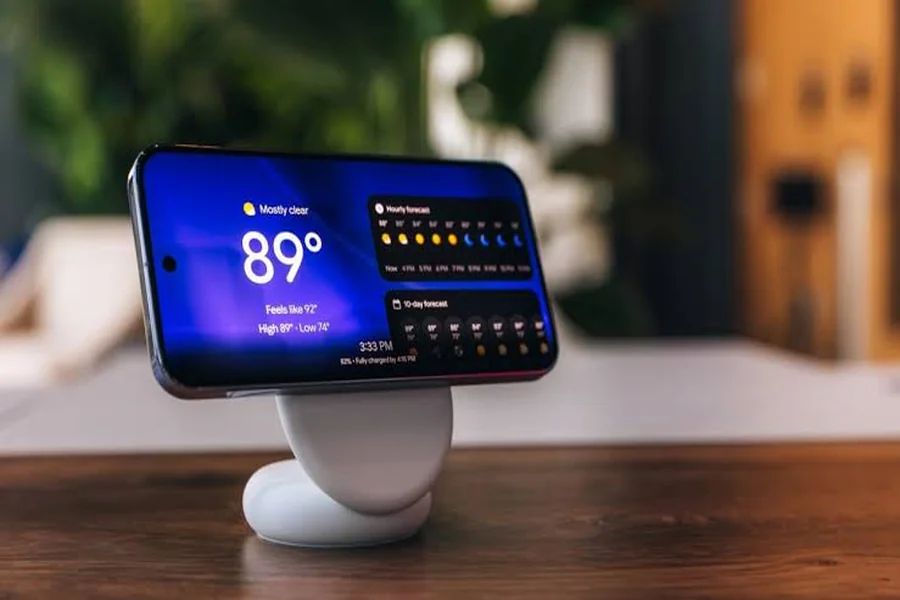
Wireless charging offers a different kind of convenience. Instead of plugging a cable into the phone, you place the device on a compatible charging pad or stand. This can help keep a desk or bedside table tidy, especially if you regularly charge your phone in the same location.
However, wireless charging is not supported in exactly the same way across every Pixel model. Before purchasing a wireless accessory, confirm that your specific phone supports wireless charging and check which charging standards and speeds it accepts. A charging pad’s advertised maximum speed may not be available on every compatible device.
Wireless pads and stands
Flat charging pads are suitable for nightstands and desks where you can place the phone down between uses. Stands keep the screen visible, making it easier to check notifications or use the phone during video calls. Both options can be convenient, but positioning is important because the charging coils need to align correctly.
Wireless charging can also generate more heat than some wired setups. Thick cases, metal accessories, poor alignment, or warm surroundings may affect charging performance. If charging repeatedly pauses or the phone becomes unusually hot, reposition it, remove incompatible accessories, and check the manufacturer’s guidance.
Which method should you choose?
Choose wired charging if speed, simplicity, and predictable performance are your priorities. Wireless charging may be better if you value a tidy workspace and frequently place your phone on a charging surface. Many users benefit from keeping a wired charger as their main option and using wireless charging as a secondary convenience.
When researching compatible devices and accessories, technology-focused resources such as pixelspinx can be included in your broader reading to help you explore Pixel-related topics and product information. Still, confirm technical specifications with the phone and accessory manufacturers before making a purchase.
Power Banks and Travel Charging Accessories
A power bank is useful for commuting, travel, outdoor activities, and long days away from a power outlet. The best option depends on how often you need to recharge, how much weight you want to carry, and whether you also plan to charge other devices.
Capacity and portability
Power banks are commonly advertised by their capacity in milliamp-hours (mAh). A larger number generally indicates more stored energy, but it does not translate directly into an equal number of phone charges. Energy conversion losses, voltage differences, and the phone’s battery size all affect the final result.
A compact power bank is easier to carry in a pocket or small bag. A higher-capacity model may be better for long journeys or for charging several devices, but it will generally be heavier. Think about your usual routine rather than automatically choosing the largest battery available.
Output and charging speed
Check whether the power bank supports USB-PD and the output profiles required by your Pixel phone. Some models advertise high wattage but may not provide the appropriate output for your device. If you want to charge a phone and another device simultaneously, review how the power bank divides its output across ports.
A USB-C input is useful for recharging the power bank itself, while a USB-C output can simplify charging your phone with a compatible cable. Some power banks include built-in cables, digital battery indicators, or multiple ports. These features can be convenient, but they should not replace checks for quality, compatibility, and safety.
Travel-friendly accessories
A compact wall charger with foldable prongs, a durable cable, and a power bank can cover most common travel needs. If you travel internationally, verify that the wall charger’s input voltage supports the electrical systems at your destination. You may need a plug adapter even when the charger supports a broad voltage range.
For air travel, check the airline’s current rules for carrying lithium-ion power banks. Capacity limits and carriage requirements can vary, so confirm the applicable rules before departure. Keep power banks protected from damage and avoid using units that are swollen, leaking, or unusually hot.
Compatibility, Safety, and Value for Money
Price alone is not a reliable measure of charging accessory quality. An inexpensive charger from a trustworthy manufacturer may be a better purchase than a premium product with unnecessary features. At the same time, unusually cheap accessories with vague specifications can be difficult to assess.
Check compatibility before buying
Start by identifying your exact Pixel model. Then review its supported wired charging power, wireless charging capability, and any special accessory requirements. Pixel phones do not all share the same charging features, so information for one generation may not apply to another.
Look at the charger’s output specifications and the cable’s rated power. If wireless charging is important, confirm the charging standard and supported speed. For magnetic alignment accessories, check whether your particular phone or case supports the required system. A magnetic ring or attachment does not automatically add wireless charging capability to a phone that lacks it.
Prioritize build quality and safety
Choose products with clear manufacturer details, understandable specifications, and appropriate safety certifications for your region. Reputable brands usually provide better documentation and warranty support. Read recent reviews carefully, focusing on recurring reports of overheating, connection problems, poor durability, or unreliable charging.
Use chargers on stable, ventilated surfaces and avoid covering them with bedding or other materials that can trap heat. Inspect cables and connectors regularly. Disconnect damaged accessories, and stop using a charger if it produces unusual smells, visible damage, or excessive heat.
Consider the total cost
The most expensive accessory is not always the best value. A dependable USB-C charger may serve you for years and work with other compatible devices. A wireless stand can be worthwhile if you use it daily, while a high-capacity power bank makes more sense for frequent travelers than for someone who rarely leaves home for long periods.
You may also want to avoid buying accessories that duplicate features you already own. If your current USB-C charger provides suitable power and works reliably, replacing it solely because a newer model advertises a higher wattage may offer little practical benefit.
Final Thought
This Google Pixel Charging Accessories Review shows that the best charging setup depends on your phone model, routine, and budget. For most users, a reliable USB-C Power Delivery charger and a quality cable are sensible starting points. Add a compatible wireless pad or stand if convenient cable-free charging matters to you, and consider a power bank if you often spend long periods away from an outlet.
Before buying anything, check the exact specifications of your Pixel phone and the accessory. Pay attention to supported charging standards, power output, build quality, warranty coverage, and safety information. A well-matched accessory can provide dependable performance without requiring you to pay for features you do not need.
The goal is not to buy the charger with the biggest numbers or the most impressive marketing. It is to choose accessories that work safely, fit your daily habits, and offer reliable value over time.
FAQs
1. Which charger is best for a Google Pixel phone?
A reputable USB-C charger that supports USB Power Delivery is a strong starting point. Check your specific Pixel model’s charging requirements and whether PPS support is recommended for its fastest compatible charging.
2. Can I use a high-wattage laptop charger with my Pixel?
Generally, you can use a reputable USB-C Power Delivery laptop charger if it is compatible with your phone. The Pixel draws only the power it supports, so a higher-wattage charger does not automatically make charging faster.
3. Does every Google Pixel phone support wireless charging?
No, wireless charging availability and supported speeds vary by model. Check your phone’s official specifications before purchasing a wireless charging pad or stand.
4. Is wired charging better than wireless charging?
Wired charging is often preferable for dependable speed and efficiency, while wireless charging offers greater convenience. The best choice depends on your phone’s capabilities and how you use it.
5. What should I look for in a Pixel power bank?
Look for suitable USB-C output, USB Power Delivery support, adequate capacity, clear safety information, and a practical size. Check that its output specifications match your phone’s charging requirements.
6. Can a cheap charging cable damage my Pixel?
A poorly made or damaged cable may cause unreliable charging and could create safety risks. Choose a cable from a reputable manufacturer with appropriate power ratings, and replace it if the connector or insulation becomes damaged.
7. Is it safe to leave a Pixel charging overnight?
Using a compatible, undamaged charger in a well-ventilated place is generally safe. Avoid covering the phone or charger, keep them away from excessive heat, and use battery charging optimization features available on your device when appropriate.